

How to Repost Photos: A Step-by-Step Guide
Reposting photos on social media is a fantastic way to share content you love while showing appreciation to the original creator. Whether you want to share a friend’s vacation snapshot, an inspiring quote, or beautiful artwork, knowing how to repost correctly can enhance your social media experience. In this guide, we will cover various methods for reposting photos across different platforms, focusing particularly on Instagram. Additionally, we will highlight how to repost photos on instagram, as this platform has its own unique practices and tools. Let’s dive in!
Why Repost Content?
Reposting content is not just about sharing photos; it can help you build connections with other users, showcase your interests, and provide your followers with diverse content. Here are a few reasons why you might want to repost:
- Engagement: Sharing content that resonates with you can increase your interactions and engagement on your profile.
- Community Building: Reposting allows you to support others and create a sense of community on social media.
- Diversity of Content: It adds variety to your feed, keeping your audience interested.
- Crediting Creators: It shows respect for the original creator and ensures they receive the recognition they deserve.
Different Methods to Repost Photos
There are various methods for reposting photos, depending on the social media platform you’re using. Below, we will explain how to repost photos on popular platforms like Instagram, Facebook, and Twitter.
Reposting on Instagram
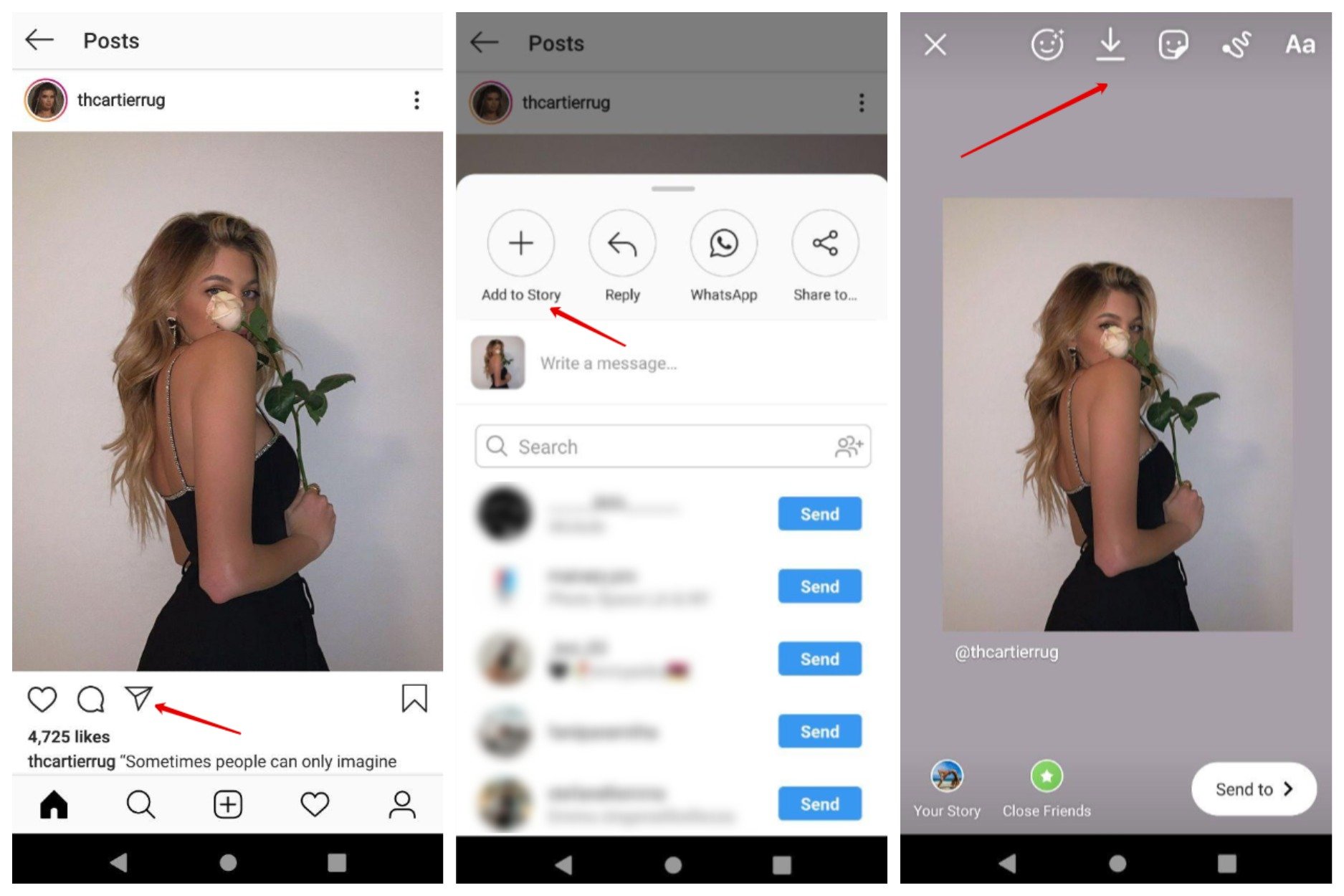
Instagram is one of the most popular platforms for photo sharing, and reposting here has its own set of rules and tools. Here are the steps:
1. Using Repost Apps
There are several applications available to make reposting on Instagram easy. One such app is “Repost: For Instagram”, which allows you to share posts while automatically crediting the original creator. Here’s how to use it:
- Download the App: Install a reposting app from your device’s app store.
- Find the Post: Open Instagram and find the post you want to repost.
- Copy Link: Tap the three dots on the top right corner of the post and select “Copy Link”.
- Open the Repost App: Launch the repost app and your copied link will appear. Select the post.
- Share It: Customize the caption if desired and hit repost to share it on your feed or stories.
2. Manual Reposting
If you prefer not to use a third-party app, you can repost manually by following these steps:
- Take a Screenshot: Capture a screenshot of the post you wish to share.
- Edit the Image: Use an image editing app to crop the screenshot to the desired area.
- Upload to Instagram: Create a new post and select the edited image.
- Credit the Original Creator: In the caption, mention the original user, such as “Photo by @username”.
Reposting on Facebook
Facebook makes reposting quite straightforward. Here’s how:
- Find the Post: Navigate to the post you want to share.
- Share Button: Click the “Share” button below the post.
- Select Sharing Option: Choose whether to share it on your timeline, in a group, or in a message.
- Add Comments: Optionally, add your comments or thoughts to the post before sharing.
Reposting on Twitter
Reposting (or retweeting) on Twitter is quick and easy:
- Locate the Tweet: Find the tweet you wish to repost.
- Retweet Option: Click the “Retweet” button underneath the tweet.
- Add Comments (Optional): You can add your thoughts to the tweet before confirming the retweet.
Best Practices for Reposting
Reposting should be done thoughtfully. Here are some best practices to consider:
- Always Credit the Original Creator: This is crucial to respect the rights of the content creator.
- Ask for Permission: It’s best practice to ask for permission before reposting someone else’s work.
- Keep it Relevant: Ensure the reposted content aligns with your brand or personal values.
- Engage with the Original Post: Liking and commenting on the original content can enhance relationships with other users.
Conclusion
Reposting photos on social media platforms like Instagram, Facebook, and Twitter can significantly enhance your online presence while fostering connections with other users. By using the methods outlined in this guide, you can easily share content that you love while respecting the original creators. Remember, social media is about sharing and connecting, so ensure you approach reposting in a respectful and meaningful manner. Happy reposting!
Comments are closed